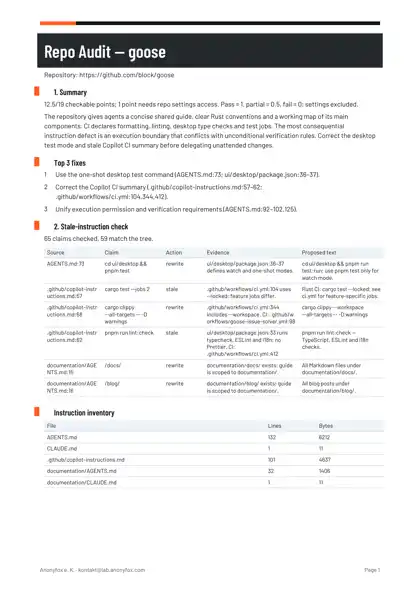
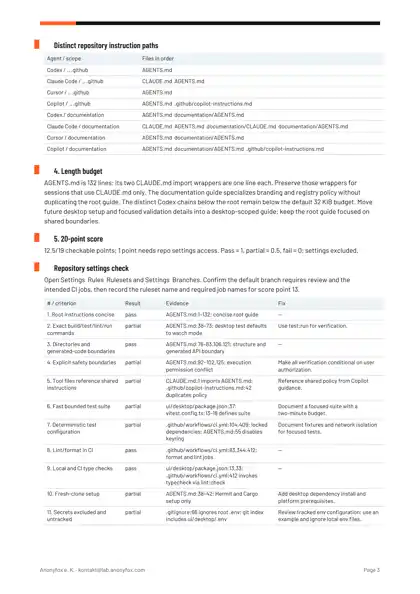
In our audit of block/goose on 21 October 2026, 59 of 65 instruction claims matched the code; 6 needed a rewrite, and the repository scored 12.5 of 19 checkable points.
Every instruction claim needs a source. Every correction needs a reason.
One public repository. Up to 10 instruction files / 1,200 instruction lines. For larger repositories, we email you before starting with what we will cover. Static review: we never run your code.
Agent-readiness scan: ~/src/goose
  [x] AGENTS.md present
  [x] AGENTS.md is concise (132 lines)
  [x] AGENTS.md mentions test commands
  [x] AGENTS.md states boundaries
  …
  [ ] glob-scoped rules  ->  scope rules with globs (Cursor only)
  [ ] guard hooks  ->  copy .claude/hooks + .cursor/hooks.json from the kit
  …
Score: 11/14  (heuristic scan; full 20‑point audit: checklists/agent-readiness.md)
Excerpt from the Kit scanner run on block/goose on 21 October 2026. The scan has 14 automated checks; the full checklist in the Kit has 20 points.
Adapt the commands and paths, then check the installed permissions and hooks. Claude’s supplied failure-blocking setting needs v2.1.295+ and the guard needs jq.
What enforces a boundary?
Layer
What it does
Where it stops
Instruction files
Guide the model.
Loading varies. Markdown is not an access boundary.
Claude permission rules
Deny matching tools and inputs.
Indirect script access needs a sandbox.
Claude / Cursor guard hook
Denies detected secret-looking paths; asks about detected destructive shell commands.
Configured events and text matching only. No called-script inspection, symlink resolution or MCP coverage.
Codex sandbox and approvals
Enforce execution access and gate escalation.
Configured separately. Workspace access does not hide workspace secrets. The Kit does not configure Codex hooks.
Required CI checks
Block merging when required by the repository.
The Kit installs no CI workflow.
The Kit covers instructions and guard rails. For interface design and copy, Sans Slop adds UI and writing rules for the same agents, with a checker you can run in CI.
Why not use a free template?
CLAUDE.md
Use one if it fits. The work is connecting it to your repository.
The Kit combines the shared file, tool-specific setup, guard hook, six workflow prompts and checks. You replace the example commands and paths.
The Audit checks the actual tree, resolves conflicting guidance and writes concrete corrections. Read the sample to judge that work.
Public problem reports, not product reviews or endorsements.
“My CLAUDE.md specifies running analyzers before completion. Agents appear to ‘reason about’ code instead of actually executing the tools.”
One public repository. Up to 10 instruction files / 1,200 instruction lines. For larger repositories, we email you before starting with what we will cover. Team Pack applies that scope to each repository.
What happens after I pay?
delivery
Enter your public repository URL.
For an audit, enter the GitHub, GitLab or Codeberg URL at checkout.
Download your Kit.
Kit and bundle purchases open the download page right after payment. A confirmation email follows.
Read your report.
Single-repository audits arrive by email as PDF + Markdown within 48 hours of payment. The Team Pack’s three audits and cross-repo summary PDF arrive within 5 working days.
What else should I know?
Can you review private repositories?
Email us before buying.
Which agents are covered?
Claude Code, Codex, Cursor and GitHub Copilot, plus other agents through AGENTS.md. Loading and scope vary by tool. The Kit includes setup notes for each named tool.
Do you run my code?
No. The audit is a static review of instruction files, source, manifests and CI configuration. We never run your code.
What if my repo has no AGENTS.md?
The audit drafts an AGENTS.md from the code and repository configuration.
Can I get an invoice for my business?
Yes. Enter your business details at checkout and Stripe emails the invoice. No VAT is charged under § 19 UStG (German small business regulation).
How does the Kit differ from free templates?
Free templates are a useful starting point. The Kit combines shared instructions, tool-specific setup, a guard hook, workflows, a read-only scan and regression tests. You adapt the commands and paths. The Audit checks your actual repository and proposes specific corrections.
What happens next?
Thank you. Your audit starts with the repository you entered. The report arrives by email within 48 hours.