The headline
Before Unlock your seamless workflow
After Plan next week’s shifts in one table
Name the task. Remove the label above the heading.
Drop-in UI and copy rules for coding agents. A checker that catches the tells before you commit.
For Cursor, Claude Code, Codex and agents that read AGENTS.md or SKILL.md.
One-time payment. Unlimited own and client projects.
Unlock your seamless workflow
Plan next week’s shifts in one table.
Then check the files.
examples/before.html:5:19 ui.gradient [hard] Blue or purple gradient -> use one flat subject color
examples/before.html:13:28 ui.eyebrow [hard] Label above heading -> merge useful information into the heading
examples/before.html:17:1 copy.actions [hard] Generic action label: get started -> name the next step and its resultThe same gradient. The same three icon cards. A headline that could sell anything.
If your draft has a purple gradient, a label above every heading and three cards saying almost nothing, asking the agent to “make it less AI” leaves it guessing about what to change.
Give it the rules you want it to follow, then run the checker on the files it changed.
The AGENTS.md core is 763 bytes. Keep it always on; load the longer references for the review.
AGENTS.md / CLAUDE.md.cursor/rules/*.mdcskills/sans-slop/lists/tokens/examples/check/README.md / LICENSE.mdRun the supplied checker on your repository. It flags listed UI patterns and stock copy, then suggests a correction.
python3 check/sans-slop-check.py examples/before.htmlexamples/before.html:1:1 ui.defaults [hard] Combined default signals -> review the chosen direction against the product
examples/before.html:5:19 ui.gradient [hard] Blue or purple gradient -> use one flat subject color
examples/before.html:13:28 ui.eyebrow [hard] Label above heading -> merge useful information into the heading
examples/before.html:17:1 copy.actions [hard] Generic action label: get started -> name the next step and its result
sans-slop: 26 hard findings, 0 watch warnings in 1 files; 16 rulesAfter the edits: examples/after.html
sans-slop: 0 hard findings, 0 watch warnings in 1 files; 0 rulesScan source folders before a commit. Each finding names the file, line, rule and suggested fix.
Replace the copy or CSS it flags. Keep intentional exceptions documented with the supplied ignore format.
Hard findings exit with status 1. Watch words warn at the documented frequency; add --strict to make those warnings fail too. Use the supplied hook and workflow in your repository.
The skill then has the agent look at the page at phone and desktop width and check contrast before it reports done.
Copy the files for the tool you use. Keep the same rules when you change agents.
| Agent | File to use | Where it goes |
|---|---|---|
| Cursor | .cursor/rules/*.mdc | Copy the three files into your project’s .cursor/rules/ directory. |
| Claude Code | CLAUDE.md | Merge the rules. Copy the skill into .claude/skills/sans-slop/. |
| Codex | AGENTS.md | Merge the marked section. Copy the skill into .agents/skills/sans-slop/. |
| Other AGENTS.md agents | AGENTS.md | Merge the marked section into the project instructions. |
| Grok Bot / SKILL.md agents | skills/sans-slop/ | Copy the whole skill folder into the agent’s configured skill directory. |
| Windsurf / Copilot | AGENTS.md | Merge the rules and point the tool’s project instructions at that file if needed. |
Keep the extracted pack in .sans-slop/ and set the checker path in your instructions. Skill discovery depends on the tool and version; the README gives the paths.
Three edits from the pack’s fictional scheduling example. Keep both versions in view.
Before Unlock your seamless workflow
After Plan next week’s shifts in one table
Name the task. Remove the label above the heading.
Before Get started
After Create a rota
Tell the reader what the button does.
Before Elevate your experience
After Team plan: EUR 18 per month
State the price, then the contents: 12 staff accounts and CSV export.
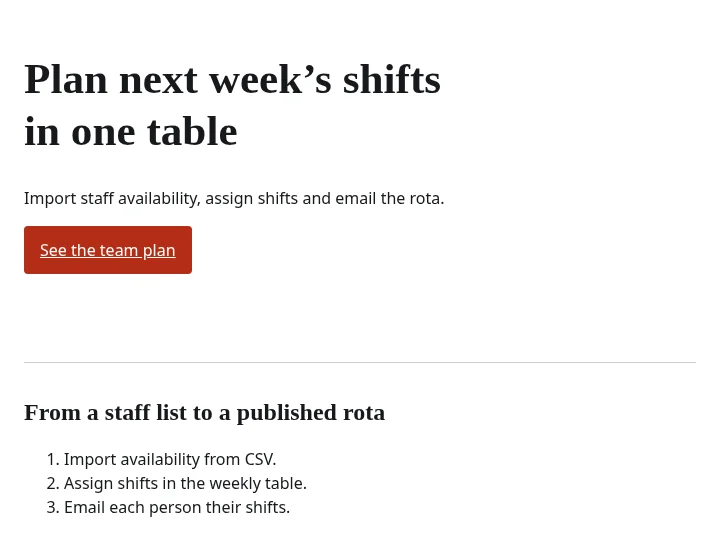
examples/after.html included in the pack. Rota, a fictional scheduling app, demonstrates the rules.Get the top 50 AI words and phrases with plain replacements, plus a short excerpt of the project rules.
Markdown file. No email needed.
Set the rules once.
Take them to the next project.
The price covers the assembled project rules, agent files, replacement lists, examples and checker, with commit-hook and CI setup.
€29 / once at launch
€39 from 1 December 2026
Download page right after payment, plus a confirmation email.
Buy Sans Slop · €29I run these rules as a release gate on my own lab, because a rule in an instruction file needs a second check against the page the agent actually wrote. Sans Slop carries that process into the next repo: the project rules, the references and the checker stay together.
Fox · Maximilian Stroh, Anonyfox Lab
Need instructions checked against your code too? See the Agent Kit templates and public Repo Audit.
Yes. Keep your Tailwind or shadcn components and change the defaults through the supplied v3 preset or v4 theme. For an existing project, merge the tokens you need rather than replacing the whole theme. Run the checker on the source files after the agent edits them.
No. The rules your agent always sees are short: read the brief, use your real content, pick one direction. The lists only come out after the draft is written. They catch the defaults; they don’t pick a look for you. Change the palettes and tokens to fit your brand.
No. You pay €29 once for v1.0; the price rises to €39 on 1 December 2026.
Free updates throughout v1.x.
Use the pack in as many of your own or your clients’ projects as you need, for personal or commercial work; keep the pack itself out of anything you resell or redistribute.
After payment you reach the download page and receive a confirmation email.
Run it with Python 3.8 or later, using only the standard library, and keep the lists directory beside the checker; no network connection required.
Most free skills I looked at are one long prompt. Here, the part your agent always reads is 763 bytes, and the rest loads when it reviews. You also get a checker: it names the file, the line and the fix, and it fails CI on a hard tell. The lists, tokens and examples come with it, set up for each agent.